
Merge Pictures Online Free: Combine Photos in Seconds
Looking to merge pictures online free without hassle, watermarks, or complex software? You’re in the right place! Merging photos—whether for side-by-side comparisons, memory collages, or social media content—should be simple, accessible, and cost-free. That’s where MergePictures.net comes in: a browser-based tool that lets you combine two (or more) images in minutes, no subscriptions or downloads required.
Why Choose to Merge Pictures Online Free?
Gone are the days of struggling with expensive editing software like Photoshop or clunky apps that leave watermarks on your work. Merging pictures online for free offers unbeatable convenience:
- Zero cost: No hidden fees, trial periods, or paywalls—just free, unlimited merging.
- No installation: Use it on any device (laptop, phone, tablet) directly in your browser.
- Fast results: Skip the learning curve and get merged images in seconds.
- Clean output: No watermarks, logos, or branding—your photos stay 100% yours.
How to Merge Pictures Online Free with MergePictures.net
Follow these 4 straightforward steps to merge your images without spending a dime:
Step 1: Upload Your Images
Head to MergePictures.net and find the upload zone (labeled “Click or drag files here to upload”). You can either click to select photos from your device or drag-and-drop them directly—perfect for quick uploads. Common formats such as JPG, PNG, and WebP are supported.
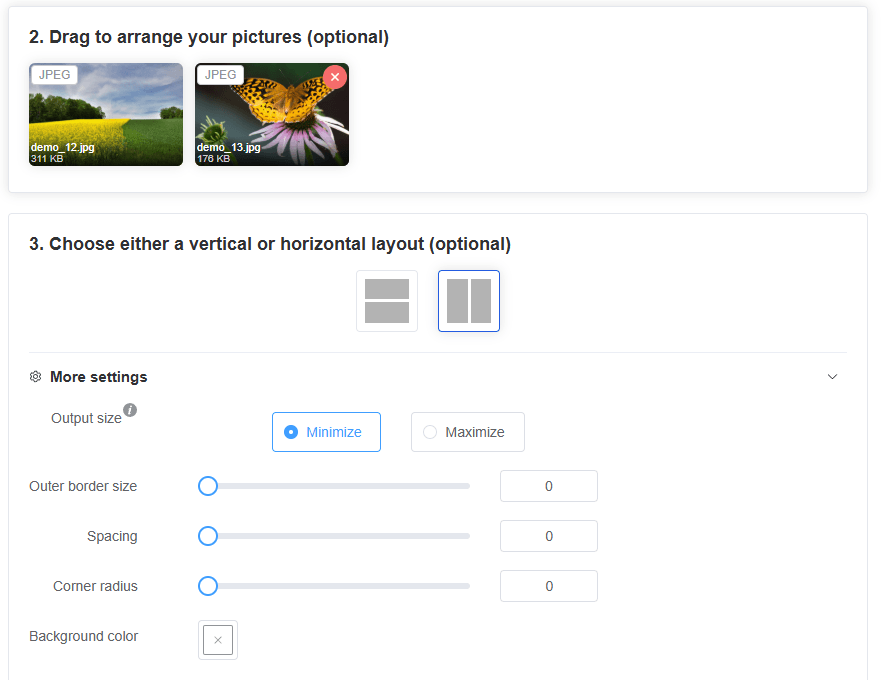
Step 2: Adjust Order (Optional)
If the sequence of your images matters (e.g., before-and-after shots), simply drag the thumbnails to rearrange them. This step is totally optional—keep the default order if it works for you!
Step 3: Pick Your Layout (Optional)
Choose between vertical (one image above the other) or horizontal (side-by-side) layout. The tool automatically optimizes the size and alignment, so you don’t need to tweak any technical settings.
Step 4: Merge and Save
Click “Merge Images” and wait a few seconds. Once done, a pop-up will appear with your merged image. Save it easily:
- Use the universal “Download” button in the pop-up.
- For Windows: Right-click the image and select “Save.”
- For iOS: Long-press the image and follow prompts to save to your photo library.
Who Can Benefit from Merging Pictures Online Free?
This tool is for everyone—no technical skills required:
- Social media users: Create eye-catching side-by-side posts, Reels thumbnails, or Instagram carousels.
- Content creators: Merge screenshots, product photos, or before/after shots for blogs or YouTube.
- Everyday users: Combine family photos, travel snapshots, or pet pics into cherished collages.
- Professionals: Quicken workflows by merging images for presentations, client work, or portfolios—without sacrificing quality.
Final Thoughts: Merge Pictures Online Free Has Never Been Easier
Merging pictures shouldn’t cost money or cause frustration. With MergePictures.net, you get a reliable, user-friendly solution to combine images online for free—anytime, anywhere. Whether you’re merging two photos or a handful, the process is seamless, and the results are clean and professional.
Skip the paid tools and complicated apps. Try MergePictures.net today to merge pictures online free—your next perfect combined image is just a few clicks away!