
Introducing the Overlay Image Tool: Layer Photos, Text, and More
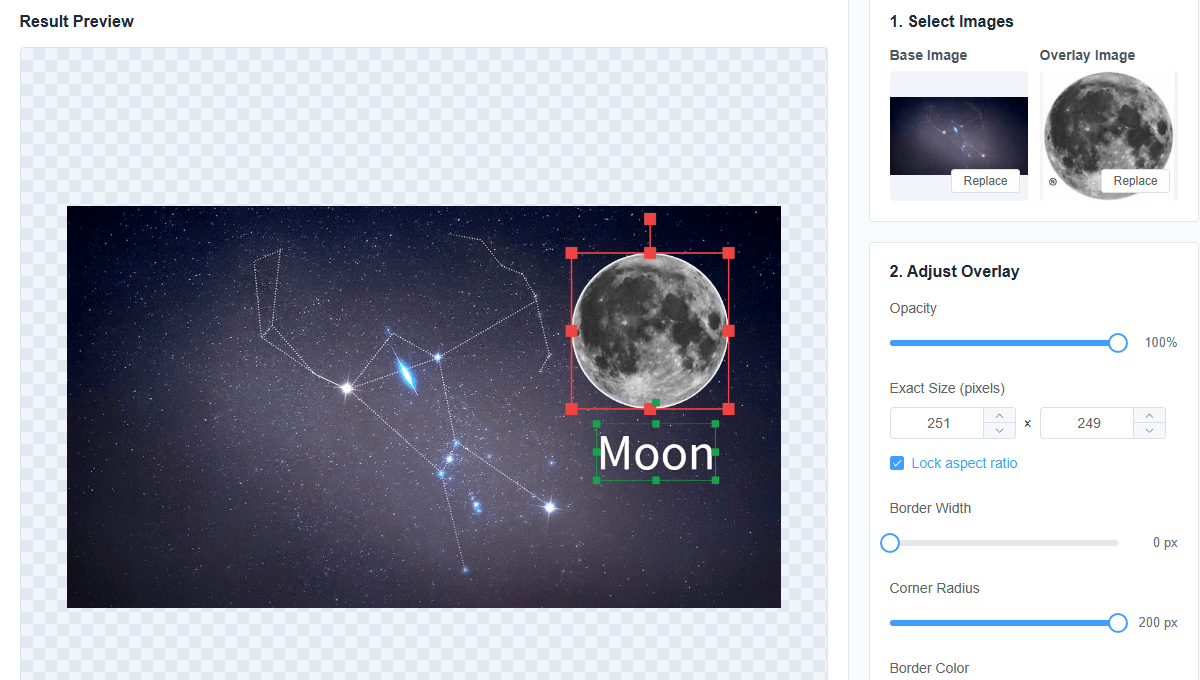
We have added a new Overlay Images workspace to MergePictures. It is designed for quick watermarks, labels, compositing, and creative image layouts without requiring desktop editing software.
Build a layered image in your browser
Start by choosing a base image and an optional overlay image. The overlay is rendered locally on a Canvas, so your files stay on your device. The editor automatically fits the first overlay inside the base image and keeps the preview within the available workspace.
You can drag the overlay to reposition it, use the transform handles to resize it, and use the rotation handle to change its angle. Opacity, border width, rounded corner radius, and border color are available as live settings. Rounded corners clip the overlay itself, so the corners remain transparent in the exported image.
Add multiple text layers
Text is optional and can be enabled when needed. Add as many text layers as you like, select any layer from the list, and edit its content instantly. Each layer has independent controls for size, color, bold, and italic styling. Text can also be moved, resized, and rotated directly on the preview canvas.
Preview and export
The Preview button opens a clean result dialog without editing handles. From there, download the composition as PNG or JPG. You can also download directly from the workspace, including text-only compositions that do not use an overlay image.
All processing happens locally in the browser. No image upload, account, or installation is required.